
Switch by Speaker
Switch by Speaker cuts a whole program for you from a conversation. It listens to each person’s microphone and writes a new track that shows whoever is talking.
- Menu
- Clip ▸ Switch by Speaker…
- Needs
- Nothing. It reads each microphone's loudness and speech detection, made on your Mac at import, with no key and no upload.
- Agent tools
switch_by_speaker
Cut a conversation
Section titled “Cut a conversation”-
Synchronize the recordings with Clip ▸ Synchronize Audio.
-
Select every camera’s clips and every microphone’s clips. ⇧-click each clip to add it, or ⇧-drag a band across them. See Select clips.
-
Choose Clip ▸ Switch by Speaker…. It has no keyboard shortcut, and it sits right after Synchronize Audio in the Clip menu.
-
Check the speaker rows and adjust the settings if you need to. The summary at the foot of the sheet updates as you do.
-
Choose Switch or press Return. Cancel or Esc leaves everything as it was.
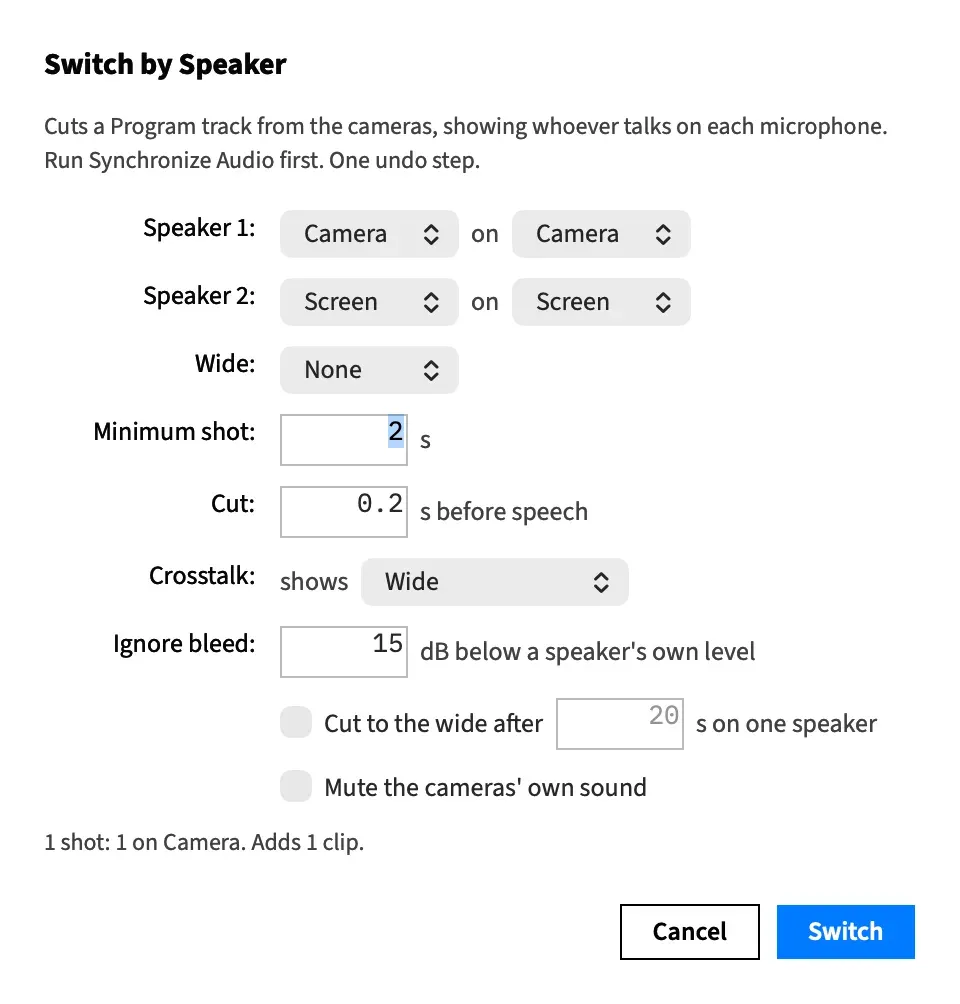
Afterwards, fix single shots by hand. Switch by Speaker works inside an open nest too, on the nest’s own tracks.
Synchronize first
Section titled “Synchronize first”Switch by Speaker trusts where the clips sit. It doesn’t check that they’re in sync, so run Synchronize Audio before it.
A camera slipped or dragged afterwards puts its shots out of step with the voices.
When it is offered
Section titled “When it is offered”Clip ▸ Switch by Speaker… is available when:
- the selection holds clips with a picture on two or more tracks, each of which is a camera
- at least one selected clip has its sound on, from a file that has sound
- no sheet is open on the window
Sound you’ve split off with Clip ▸ Detach Audio never makes its track a camera. The sheet handles up to nine cameras. The command is still offered with more, but the summary then says so and Switch stays dimmed.
Speaker rows
Section titled “Speaker rows”Each person gets a row, reading Speaker 1:, then a microphone pop-up, the word “on”, and the camera that shows them. A camera that is its own microphone stays paired with itself, and the rest are paired front to back to start with. See Microphones for how the microphones are chosen.
Each person needs their own microphone and a camera. A pop-up offers None only where the selection left that row with nothing to pair. Leave it on None and the summary says what’s missing.
Change the rows when the front-to-back guess puts someone on the wrong camera. The microphones listed come from your selection, and the cameras from the tracks holding your selected pictures.
With exactly one microphone and two or more cameras, the rows are replaced by a different layout. See Cut from faces with one microphone.
The range
Section titled “The range”The cut covers the In–Out range when one is set, otherwise the whole length of the selected camera clips.
Only the selected clips of a microphone’s track are listened to. A camera track offers all its clips with a picture, selected or not, so an unselected clip on a camera track can still supply shots.
The summary
Section titled “The summary”The line under the controls says what Switch will do, for example “22 shots: 8 on Cam A, 14 on Cam B. Adds 23 clips.” Cameras appear in the order they first show.
When Switch can’t go ahead, every reason replaces that line, one per line, and Switch stays dimmed. The sheet works this out again at every change, so change any control to check again.
| The summary says | What it means |
|---|---|
| “The microphone on track … is still being analysed…” | Frame Job hasn’t finished measuring that file’s loudness or detecting its speech, which can happen straight after an import. Give it a moment, then change any control to check again. |
| “The microphone on track … has no speech between … and …, so it never says who is talking.” | That microphone hears no speech in the range. Check you’ve paired the right track, or shorten the range. |
| “No angle has a picture between … and ….” | No camera covers that stretch of the range. Set an In–Out range that avoids it, or fill the gap. |
| “The speaker on track … has no microphone.” | A row has no microphone that’s selected and sounding. |
| “The microphone on track … has no angle to show its speaker.” | A row has no camera. |
| “Track … is the microphone for 2 speakers; each person needs their own microphone.” | One microphone is on two rows. See Good to know for when that’s allowed. |
| “Switch by Speaker takes at most nine angles…” | More than nine tracks hold a selected picture. Select fewer. |
| “Switch by Speaker would add … clips to …; the most is 4096 — raise the minimum shot.” | A project holds at most 4,096 clips. Raise Minimum shot for fewer, longer shots. |
| “Speech detection is unavailable on this Mac, so Switch by Speaker cannot tell who is talking.” | The on-device speech model can’t run here, so the command can’t work. |
| “The project’s audio plan could not be read. Try again in a moment.” | Frame Job couldn’t read the project’s sound just then. |
An “angle” in these lines is a camera. The track number is Frame Job’s own number for the track, not its position on the timeline. With one shared microphone, two more lines can appear.
Switch checks everything once more when you press it. If it can’t go ahead at that moment, the reason shows in the summary and the sheet stays open.
How it chooses the shots
Section titled “How it chooses the shots”- A cut lands a moment before each new speaker’s first word. Cut sets how long.
- Silence holds the current shot, and so does a reply under a second long.
- A pause under half a second between one person’s words doesn’t end their turn.
- The cut opens on the Wide, the camera you’ve chosen for your wide shot, when there is one, otherwise on the first speaker’s camera. With no Wide and nobody taking a turn, the range is one shot on the front-most camera.
- When two people talk at once, Crosstalk decides what shows.
- Where a shot’s camera has nothing to show, that stretch goes to the Wide, else the camera before it, else the front-most camera that covers it.
- A shot under Minimum shot merges into a neighbour.
Linked cameras
Section titled “Linked cameras”A camera clip still linked to its detached sound can’t be switched. The sheet says so and names the clip, ending “Attach Audio first”. Choose Clip ▸ Attach Audio to put the two back together, then try again.
Only a linked camera clip crossing the range stops the cut.
One undo step
Section titled “One undo step”Switch writes all of this as one undo step, Switch by Speaker. The selection stays. A selected clip cut at the range’s ends brings its new half into the selection.
The Program track
Section titled “The Program track”Switch adds a track named Program directly in front of the front-most camera. It holds a piece of the chosen camera for each shot, in sync, with the picture on and the sound off.
To write over an earlier Program track instead, use Write to.
Cameras hidden
Section titled “Cameras hidden”Switch hides the camera tracks so only the program shows.
A camera track that holds anything outside the range, or any clip without a picture, isn’t hidden. Its clips are cut at the range’s ends and their pictures are switched off inside the range only.
What stays untouched
Section titled “What stays untouched”Nothing outside the range changes. The microphones aren’t edited, so what you hear stays the same, apart from any camera sound you chose to mute.
Fix the result
Section titled “Fix the result”- To show a different camera for one shot, select the shot and use Switch Angle.
- To move a cut, roll it.
- To try other settings, choose Switch by Speaker… again while the clips are still selected, and pick the old track under Write to. Or undo and start over.
Good to know
Section titled “Good to know”- One microphone on two rows stops the cut when other rows have their own microphones. If you point every row at one microphone, Frame Job reads faces instead, and the summary starts with its warning.
- Switch by Speaker doesn’t remember your pairing. The speaker rows open fresh each time.
With an agent
Section titled “With an agent”switch_by_speaker takes the sheet’s values and a few it doesn’t show. An agent can name the range directly, which takes priority over the In–Out range, and pair people by hand. It can also ask for the shots without editing anything, and set the shortest turn that cuts and how far one microphone must lead to count alone. See Switch by Speaker from an agent.