
Camera Log
Log footage looks flat and grey until it’s converted. Camera Log tells Frame Job which curve a video file was shot with, so the file displays as a normal picture before you grade it. It’s the input transform, so these curves need no colour space transform or conversion LUT.
- Where
- Media tab ▸ Camera Log ▸ Log
- Needs
- A video file in the project.
- Agent tools
set_media_colorget_projectimport_mediaundo
Set a file’s Camera Log
Section titled “Set a file’s Camera Log”The Camera Log section appears in the Media tab once the project has a video file.
-
Open the Media tab in the inspector.
-
Click the file in the list.
-
Choose the curve from the Log popup. Pick the row that matches how the camera was set.
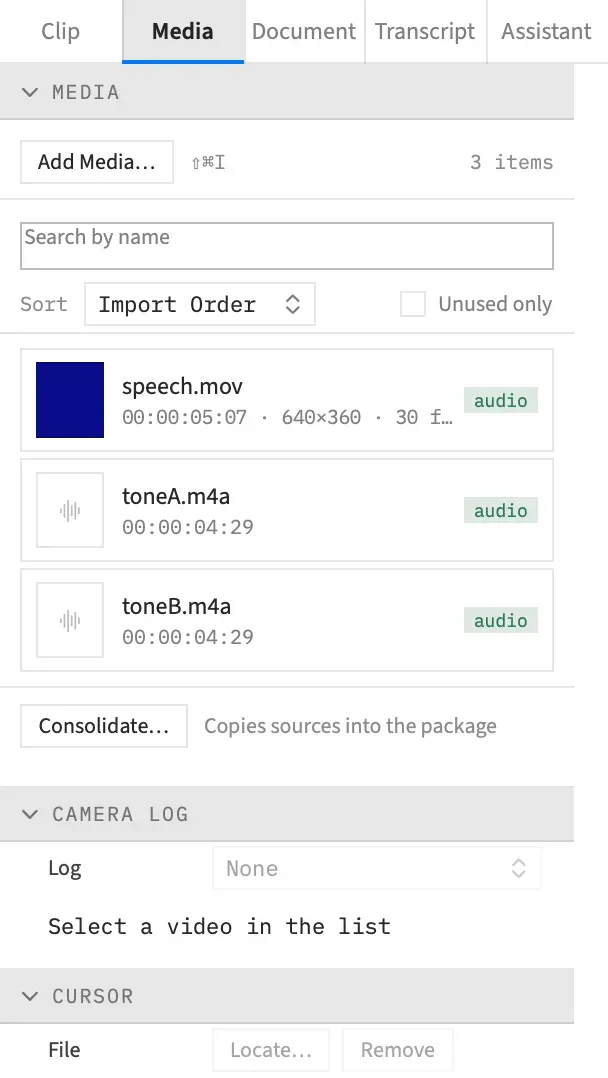
Apple Log and Apple Log 2 files are set for you on import. Sony, Panasonic and Canon files have to be set by hand.
The Log popup
Section titled “The Log popup”| Item | Curve | Camera gamut |
|---|---|---|
| None | No conversion: the file shows its log picture as recorded | |
| Apple Log | Apple Log | BT.2020 |
| Apple Log 2 | Apple Log | Apple Wide Gamut |
| S-Log3 / S-Gamut3.Cine | Sony S-Log3 | S-Gamut3.Cine |
| S-Log3 / S-Gamut3 | Sony S-Log3 | S-Gamut3 |
| V-Log / V-Gamut | Panasonic V-Log | V-Gamut |
| C-Log2 / Cinema Gamut | Canon Log 2 | Cinema Gamut |
| C-Log2 / BT.2020 | Canon Log 2 | BT.2020 |
| C-Log3 / Cinema Gamut | Canon Log 3 | Cinema Gamut |
| C-Log3 / BT.2020 | Canon Log 3 | BT.2020 |
Below these, the popup lists LUT: and the name of each .cube LUT in the project, then Use LUT…. A file is converted by a maker’s curve or by a LUT, never both. See Camera log from your own LUT.
Any other log has no built-in curve, such as ARRI LogC, RED Log3G10, Sony S-Log2, Nikon N-Log, Fujifilm F-Log or DJI D-Log. For those, use the maker’s conversion LUT.
Choosing None on a PQ file keeps its HDR10 peak override. It’s also how you see the raw log picture of a file Frame Job set by itself.
A setting on the file
Section titled “A setting on the file”Camera Log belongs to the media file, not to a clip. Every clip of the file follows it, reversed clips included, and two clips of one file can’t be read differently. The HDR10 peak belongs to the file in the same way, and changing one keeps the other.
Relinking a file with Relink… keeps its Camera Log.
Each change is one undo step, named Camera Log. Picking the row that’s already showing changes nothing and makes no undo step.
What the section says
Section titled “What the section says”A line under the popup says what’s set. The section’s header repeats the selected file’s curve or LUT name, so you can read it with the section closed.
| The line reads | What it means |
|---|---|
| The setting, such as “S-Log3 / S-Gamut3.Cine” or “LUT: name” | You chose this row. |
| The setting with “— from the file”, such as “Apple Log — from the file” | Frame Job read it from the file’s label on import. |
| “None” | Nothing is set, so the file shows as recorded. |
| “Select a video in the list” | The selected row isn’t a video file, or no row is selected. The popup is disabled. |
Detection on import
Section titled “Detection on import”An Apple Log or Apple Log 2 file is recognised by its label when you import it, so it looks like normal video straight away. Apple Log is paired with BT.2020 and Apple Log 2 with Apple Wide Gamut, and the line under the popup adds “— from the file”.
To see the raw log picture of such a file, choose None. If you then choose its curve again by hand, the line no longer says “— from the file”.
Only the two Apple curves are detected. Sony, Panasonic and Canon files carry no label Frame Job can read, so choose S-Log3, V-Log, C-Log2 or C-Log3 yourself.
How a curve is displayed
Section titled “How a curve is displayed”Each built-in curve follows its maker’s published curve and gamut. Cinema Gamut’s primaries come from the ACES project’s Canon transform. Frame Job’s display transform then turns the footage into a normal-looking picture.
The table shows where a grey card’s 18 % and a white card’s 90 % land, as signal levels from 0 % at black to 100 % at the top of the scale.
| In an SDR project | In an HDR (HLG) project | |
|---|---|---|
| 18 % grey | 42 % | HLG 38 % |
| 90 % white | About 78 % | Not rolled off |
| Highlights | Roll off smoothly up to about six stops over grey | Real HDR, with no roll-off |
Thumbnails follow
Section titled “Thumbnails follow”Changing a file’s Camera Log redraws its thumbnails in the Media tab and its filmstrip on the timeline, so they show the converted picture. In an HDR (HLG) project they show it as an SDR project would draw it.
Before the grade
Section titled “Before the grade”The conversion happens before the chroma key and before every grade step. It comes ahead of every step of the grade order, Color, Light, Wheels, Curves and Look, so a grade works on the converted picture, not on flat log. View ▸ Show Ungraded (⌃⌘U) keeps it on, because it’s how the file is read.
If a clip’s file has a Camera Log and you also give the clip a LUT as a look, the Look section warns: “This clip’s file is converted by Camera Log; a camera LUT here converts it twice.” It’s only a warning, because a creative LUT on top is fine.
Which files it works on
Section titled “Which files it works on”Camera Log is for video files only. It can’t go on an audio file, an image or a LUT, and the popup is disabled for those rows. A PQ still takes an HDR10 peak but no Camera Log.
With an agent
Section titled “With an agent”set_media_color sets or clears a file’s Camera Log. get_project reads it back in media[].color, with detected: true for a file Frame Job set on import. Tools: media has the value for each curve and gamut.
An agent differs from the popup in these ways:
- Clearing a file’s Camera Log from an agent also clears a PQ file’s peak override, where None keeps it. To keep the override, an agent sends it along with the new setting.
- The call fails, with a message saying why, if it pairs a curve with a gamut that curve doesn’t take, gives a gamut with no curve, gives a curve and a LUT together, or names a LUT that isn’t in the project. The popup never offers those.
- An agent can’t set
detectedor the file’s own peak reading inpq. Only import writes them. - The call also fails if it names a nest in its
scopeargument, because Camera Log belongs to the file. With a nest open throughset_scope, the call still reaches the file, as the popup does.