
The Loudness Meter
The Loudness Meter tells you how loud your mix really is, measured the way the loudness standards EBU R 128 and ITU-R BS.1770 measure it, while the preview plays at normal speed.
- Menu
- View ▸ Loudness Meter
- Keys
- ⌃⌘L
- Where
- A column at the right of the preview, left of the scopes

Show the meter
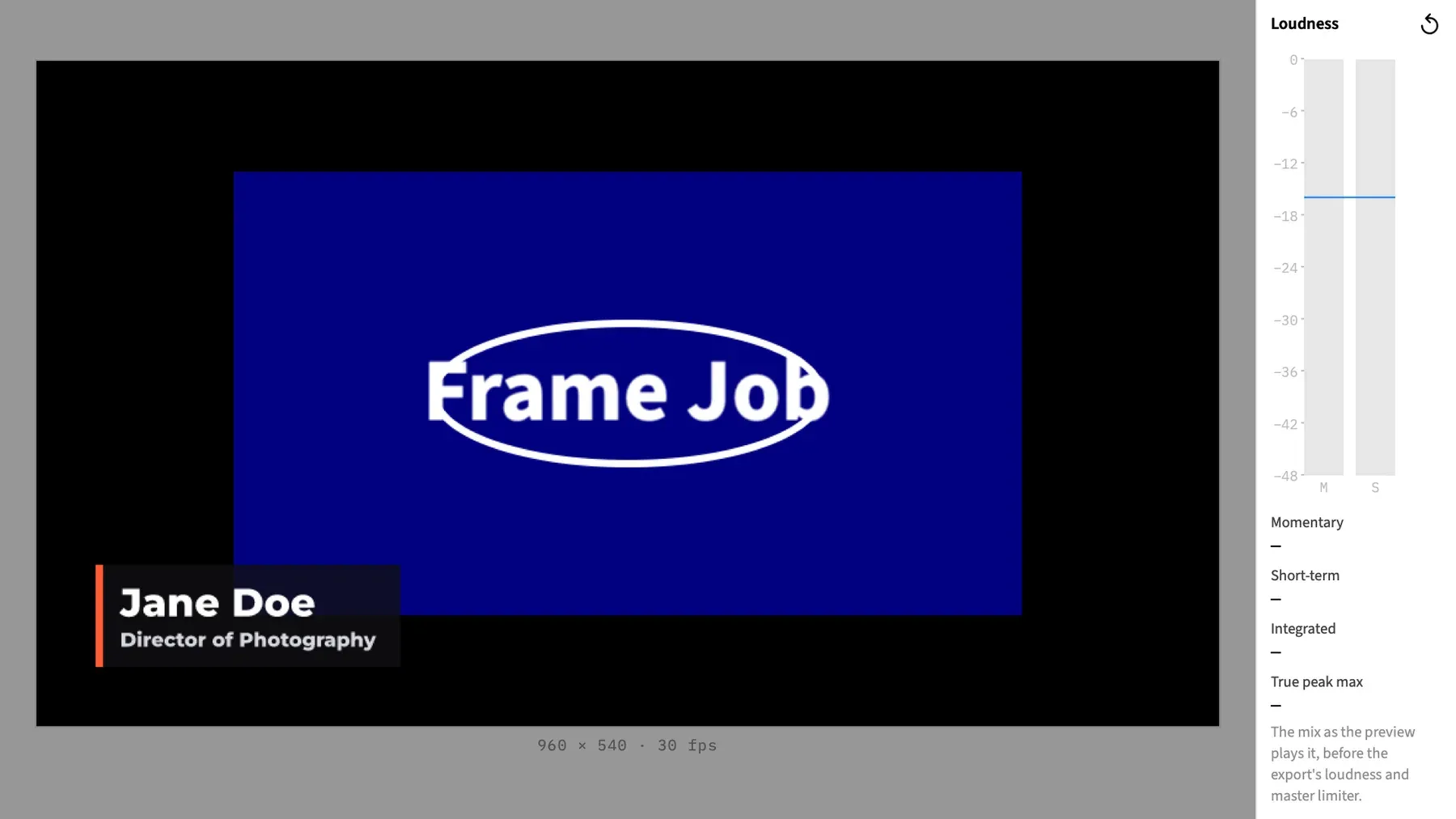
Section titled “Show the meter”Choose View ▸ Loudness Meter or press ⌃⌘L. The same command hides it, and the menu item has a tick while the column is showing. The column is 132 points wide and as tall as the preview pane, and the picture makes room for it. The command is always available.
Then play the timeline at normal speed. The figures start at “—” and fill in as Frame Job measures.
To measure a whole timeline, start at the beginning and play it through without jumping. Integrated is then the loudness of everything that played.
What it measures
Section titled “What it measures”The meter measures the mix you hear, at the level you hear it. It only reads what plays, so it never changes the project or an export.
Measuring carries on while the column is hidden. If you show it partway through a pass, the figures already include what has played.
A mono track counts in both channels. A track with more than two channels counts by its first two.
The four figures
Section titled “The four figures”| Figure | What it measures |
|---|---|
| Momentary | The last 0.4 seconds. |
| Short-term | The last 3 seconds. |
| Integrated | Everything measured since the last reset, with quiet passages left out as the standard says. |
| True peak max | The highest true peak since the last reset. It turns coral above −1 dBTP. |
Figures have one decimal place, such as −18.4 LUFS or −0.6 dBTP. LUFS is the standard unit of loudness, and a step of 1 LU on its scale is 1 dB. A true peak is the highest point the sound reaches, including between samples, and dBTP is its level in decibels.
| You see | It means |
|---|---|
| “—” | There’s no figure yet. Momentary needs 0.4 seconds of measuring and Short-term needs 3. Integrated stays at “—” until something loud enough to count has played, so it stays there through digital silence. |
| “−∞” | Digital silence. |
The M and S bars
Section titled “The M and S bars”The two bars show Momentary (M) and Short-term (S) on a scale from −48 to 0 LUFS, with a tick every 6 LU. A bar is empty while its figure is “—”, and during digital silence.
The target line
Section titled “The target line”A thin line in the accent colour crosses both bars at the target in the Normalize row, which is −16 LUFS unless you’ve changed it. It shows you where the mix sits against the level Normalize aims for.
The line moves as soon as you change the target, even while the preview is paused. The target can go as low as −50 LUFS, and anything below −48 draws at the bottom of the scale. The line stays at the stored target when Normalize is in Peak mode.
Start measuring again
Section titled “Start measuring again”Click the Reset button, the ↺ at the top of the column. All four figures go back to “—” and the next sound starts a new measurement.
The meter also starts again by itself when you jump somewhere else, such as a seek, the loop going round, or playing from another place. It does the same if Frame Job can’t keep up with the audio, because a measurement with a hole in it would be wrong.
These don’t restart it:
- Pausing and playing on. Nothing is counted twice.
- An edit.
- A gap between clips.
- Holding a menu open.
- Stepping back by less than a second.
When playback stops, the figures stay where they were.
Measuring only at normal speed
Section titled “Measuring only at normal speed”The meter measures at ×1 only. At any other speed, such as while you shuttle:
- Momentary and Short-term show “—” and their bars go empty.
- The note reads “Measured only at normal speed.”
- Integrated and True peak max keep their values.
When you stop, Momentary and Short-term go back to their last normal-speed values.
The note under the figures
Section titled “The note under the figures”The note says what’s being measured, and when to take the figures with care.
| The note says | When |
|---|---|
| “The mix as the preview plays it, before the export’s loudness and master limiter.” | Usually. |
| “The mix as the preview plays it, with track compressors and limiters approximate, before the export’s loudness and master limiter.” | While any track has a compressor or limiter. They’re approximate in the preview and exact in an export. |
| “Measured only at normal speed.” | While playing at any other speed. |
An export with a loudness target changes the level after this point, and the master limiter holds its peaks at or under the ceiling, so the export’s own report can differ from what you see here. See Export loudness.
Good to know
Section titled “Good to know”- The meter belongs to its window. A new window starts with the column off and the meter empty.
- Nothing is saved. Closing the window ends the measurement, and the column is off the next time you open the project.
With an agent
Section titled “With an agent”No agent tool shows this meter or reads it. An agent reads a mix’s loudness from an export’s report, and normalize_clip reports a clip’s measured loudness as it sets the volume. See Tools: rendering and export and Tools: audio.