
Gate
The gate turns a clip down in its pauses. When the sound falls below the threshold it’s pushed further down, so room noise and breaths between phrases get quieter while the speech itself is untouched. Above the threshold the gate is open and leaves the sound alone. It turns the pauses down, it doesn’t cut them out. To take pauses out of the timeline, use Remove Silences.
- Where
- Clip tab ▸ Sound ▸ Gate
- Agent tools
set_audio
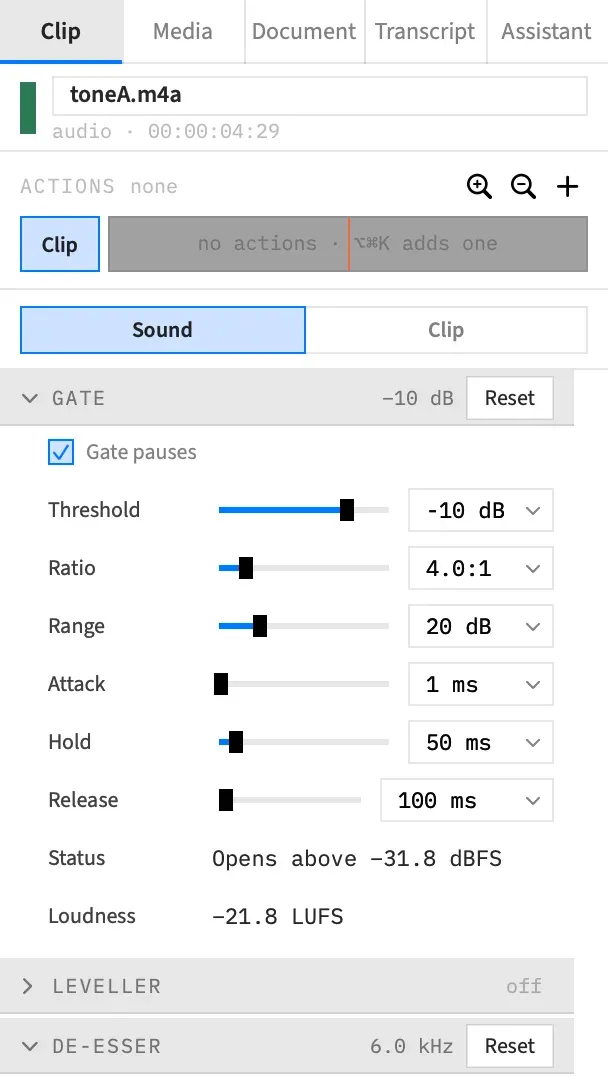
Gate the pauses
Section titled “Gate the pauses”-
Select a clip with sound, and open the Gate section of the Sound tab.
-
Tick Gate pauses. It starts at the defaults, which work from the clip’s own loudness.
-
Play the clip. If the ends of words are being cut, raise Hold or lower Threshold.
-
If the pauses aren’t quiet enough, raise Range. If they sound too empty, lower it.
The other controls are greyed out until Gate pauses is ticked. Reset in the section’s header turns the gate off.
The controls
Section titled “The controls”| Control | What it does | Range | Default | Quick picks |
|---|---|---|---|---|
| Threshold | How far under the clip’s loudness the gate opens. | −40 to 0 dB | −10 dB | −20, −15, −10, −6 |
| Ratio | How strongly sound under the threshold is turned down. At 4:1, each dB under the threshold becomes 3 dB further down. | 1:1 to 20:1 | 4:1 | 2, 4, 10, 20 |
| Range | The most the gate ever takes away. | 1 to 80 dB | 20 dB | 10, 20, 40, 80 |
| Attack | How quickly it opens when the sound rises. | 0 to 100 ms | 1 ms | 1, 5, 10 |
| Hold | How long it stays open after the sound falls, so the ends of words aren’t clipped. | 0 to 500 ms | 50 ms | 0, 50, 100, 200 |
| Release | How quickly it closes after the hold. | 1 to 2,000 ms | 100 ms | 50, 100, 250, 500 |
The threshold follows the clip
Section titled “The threshold follows the clip”Threshold is set in dB under the clip’s own loudness, not at a fixed level, so the same setting works on a quiet recording and a loud one. A trim, a pan change or a different channel choice moves the loudness, and the threshold moves with it.
That loudness is the Loudness figure in the Volume section. It’s measured before noise reduction, the compressor, the volume, the fades and ducking, so moving the Volume slider doesn’t change where the gate opens.
Read Status and Loudness
Section titled “Read Status and Loudness”Two readouts at the foot of the section show what the threshold means for this clip. With several clips selected, Loudness reads “—”. Status does too, unless the gate is off on the first of them, when it reads “off”.
Loudness is the level the threshold is measured from, for example “−21.8 LUFS”. It reads “measuring…” until the clip has been measured.
Status says where the gate opens, or why it isn’t working:
| Status | What it means |
|---|---|
| off | Gate pauses isn’t ticked. |
| Opens above −31.8 dBFS | The clip’s loudness plus the Threshold. Here, −21.8 LUFS with a −10 dB threshold. |
| Waits for its loudness | The clip hasn’t been measured yet. See below. |
| Not gating: too short | The clip plays for under 0.4 s, too short to measure. |
| Not gating: too quiet | The clip is too quiet to measure. |
| Not gating: no sound | The clip plays no sound in this timeline, or it’s a nest clip. |
Before the clip’s loudness is measured
Section titled “Before the clip’s loudness is measured”The gate, the leveller and the de-esser all depend on the clip’s measured loudness. Until it’s measured, the clip plays without them, and the preview picks them up by itself.
An export waits until every gated, levelled or de-essed clip has been measured. After five minutes without a measurement it stops, saying that the clip’s loudness or speech hasn’t been measured yet, and to wait for the Status rows to show the clip’s loudness and export again.
A clip that can’t be measured, because it’s under 0.4 s or too quiet, plays and exports without them, and the export doesn’t wait for it.
Good to know
Section titled “Good to know”- The gate runs after noise reduction and before the leveller, the de-esser and the compressor. See How audio works.
- The gate doesn’t look ahead, so a loud start after a long pause can lose its first moment while the gate opens. At the default Attack, that’s about a millisecond.
- There’s no way to listen to only what the gate takes away, so judge it by playing the clip.
- With an action selected, these controls set where the action ends. The numbers glide across the action, and turning the gate on or off changes at the action’s end.
- The gate does nothing on a nest clip. Open the nest with ⌘↓ and set it on the clips inside.
With an agent
Section titled “With an agent”set_audio sets the same controls through gate, with threshold_db, ratio, range_db, attack, hold and release. The three times use an agent’s time units, not milliseconds. An empty gate turns it on at the defaults and null turns it off. See Tools: clip sound.