
Pick from Canvas
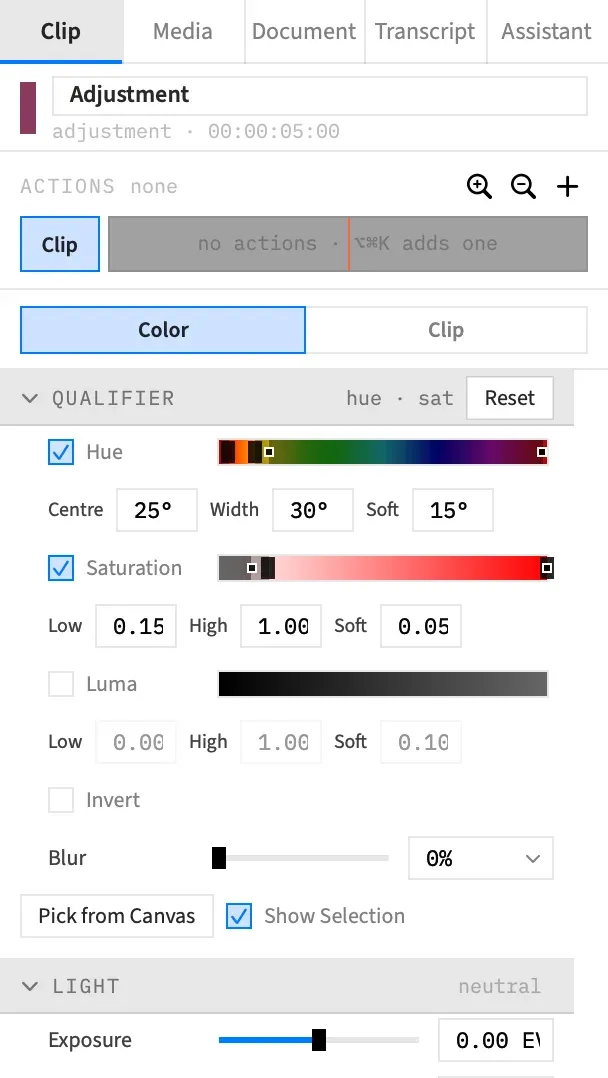
Pick from Canvas aims a qualifier at a colour you can see. You click the picture and the ranges centre on that colour, so you don’t have to find it on the strips by hand. The chroma key has an eyedropper of its own, with the same name.
- Where
- Clip tab ▸ Color ▸ Qualifier ▸ Pick from Canvas
- Needs
- Every selected clip must be an adjustment clip.
- Agent tools
set_videoset_action_end
Pick a colour
Section titled “Pick a colour”-
Select the adjustment clip, and move the playhead to a frame that shows the colour. The Qualifier section only appears while every selected clip is an adjustment clip. For any other selection the button beeps and no pick starts.
-
In the Color tab, open the Qualifier section and press Pick from Canvas. The pointer becomes a crosshair over the preview, and a hint reads “Click to pick the color to qualify · Esc to cancel”.
-
Click the colour in the preview.
The ranges move to that colour, and the pick ends. It’s one undo step, named Qualifier.
Frame Job reads the colour from the picture behind the adjustment clip, at the playhead. The clip’s own grade and every layer in front of it are left out. So the colour you get is the one the qualifier will really test, even after your grade has changed how it looks, and clicking a title on top samples what’s underneath it.
Turn on Show Selection to check what the pick caught.
What a pick sets
Section titled “What a pick sets”| Range | If it was off | If it was on |
|---|---|---|
| Hue | Turns on, centred on the colour, 30° wide with 15° softness. | Moves its centre to the colour. |
| Saturation | Turns on, centred on the colour’s saturation, 0.3 wide with softness 0.1. | Moves to centre on the colour’s saturation. |
| Luma | Stays off. | Moves to centre on the colour’s brightness. |
A range that was already on keeps its width and softness, so you can set how wide you want a range and then pick again to move it. Invert and Blur don’t change.
If you click a near-grey, there’s no real hue to aim at, so Hue turns off. A near-grey here is a colour whose strongest and weakest channels are less than 0.06 apart, on a scale of 0 to 1. Saturation still turns on and centres, which is how you pick the greys in a picture.
Saturation and Luma stay inside 0 to 1. A range that would cross either end is shifted back inside at its full width, so it’s no longer centred on the colour, but the colour stays inside it.
Pick inside an action
Section titled “Pick inside an action”With an action selected, the picked ranges go to the action’s end state instead of the clip, as any qualifier control does. The width and softness a range keeps are the ones the section is showing. Clicking a near-grey turns Hue off at the action’s end, even if the clip itself has Hue on. See Animate a grade.
Cancel a pick
Section titled “Cancel a pick”Press Esc, or press Pick from Canvas again. Changing the selection cancels the pick too. Nothing in the qualifier changes.
A click in the area around the picture beeps and the pick stays on, so you can click again.
Good to know
Section titled “Good to know”- Only one tool that waits for you on the preview can be on at a time. Starting Pick from Canvas cancels any other, such as the chroma key’s eyedropper or a Zoom to Region drag, and starting one of those cancels a pick.
- If the playhead isn’t on the adjustment clip, no layers are left out, so you sample the frame as it’s drawn.
- Show Ungraded and Show Selection don’t change what you sample. A pick reads the real picture, whatever the preview is showing.
- With several adjustment clips selected, Frame Job samples behind the first and writes the same ranges to all of them.
- In an HDR (HLG) project, a pick reads the HLG values, which are what the qualifier tests.
- If the selection changes while Frame Job is sampling, it beeps and changes nothing.
With an agent
Section titled “With an agent”No agent tool clicks the canvas. An agent writes the ranges itself with set_video, or with set_action_end for an action’s end state. See Tools: picture and grade.